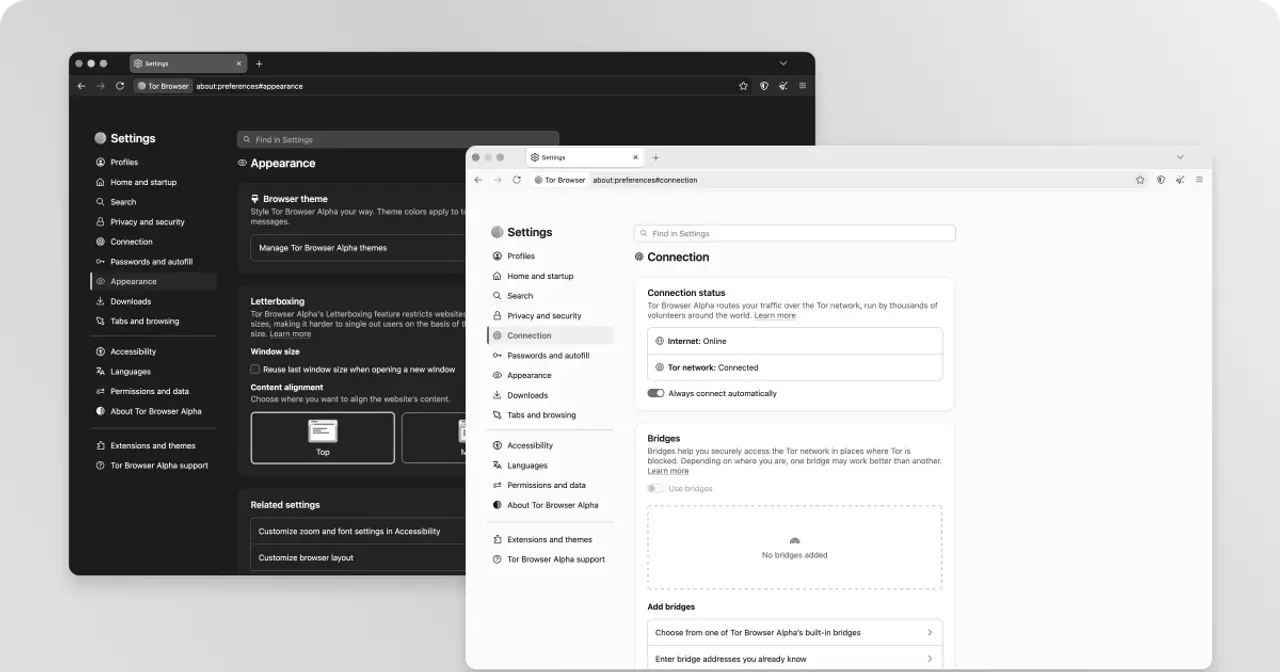
The Tor Project released Tor Browser 16.0 for desktop and Android on 29 October 2026. It’s the first stable release built on Firefox ESR 153 (153.6.0esr to be precise), so it picks up a full year of Mozilla’s work in one go. As with every ESR jump, the team first ran its yearly transition audit, going through more than 270 Bugzilla issues covering Firefox changes that could hurt the privacy or security of Tor Browser users.
Settings, rebuilt on desktop
The most visible change is the Settings page, redesigned on top of the overhaul Mozilla shipped in Firefox in June. The long-standing “General” page is gone, its contents split across new pages: Appearance, Downloads, Tabs and browsing, Accessibility and Languages. Tor-specific pages such as Connection (where bridges live) and Security Level were rebuilt from scratch with Firefox’s new components so they fit in.
One detail matters more than the looks: settings that could weaken privacy or make the browser easier to fingerprint if switched on are now hidden or carry a clear warning. Existing preferences are kept even where a setting has moved, and the search box at the top will find anything that seems to have vanished.
Generic window titles
Under Privacy and security → Protections from third-party applications there’s a new option for generic window titles. Browser windows normally take the title of the page you’re on, and any other program on the machine, or the OS itself, can read that without special permissions. With the option on, every window is just called “Tor Browser”.
It’s opt-in for now. The team says there wasn’t time this cycle to assess side effects properly, and it worries about people who rely on screen readers or run unusual desktops and window switchers; it’s asking them to try it and report problems. The feature has also gone upstream to Firefox through the Tor Uplift project: set privacy.exposeContentTitleInWindow (normal windows) and privacy.exposeContentTitleInWindow.pbm (private windows) to false in about:config.
A new manual, and Linux on ARM
The built-in manual (about:manual, or ☰ → Help) has been replaced with the content of the support portal the project launched in 2025. It’s still bundled with the browser so it can be read offline, which is exactly when you tend to need it.
After a year in the Alpha channel, Tor Browser 16.0 has native support for 64-bit ARM Linux (AArch64), think Raspberry Pis or Apple Silicon Macs running Linux. Anyone who stayed on Alpha just for that can move to stable. Going the other way, and following Firefox, support for 32-bit x86 Linux ends. The team sees about 200 update checks a day from that platform, down from a peak of around 4,000 in 2019, and most of those machines should be able to switch to the 64-bit build.
Android moves to Material Design 3
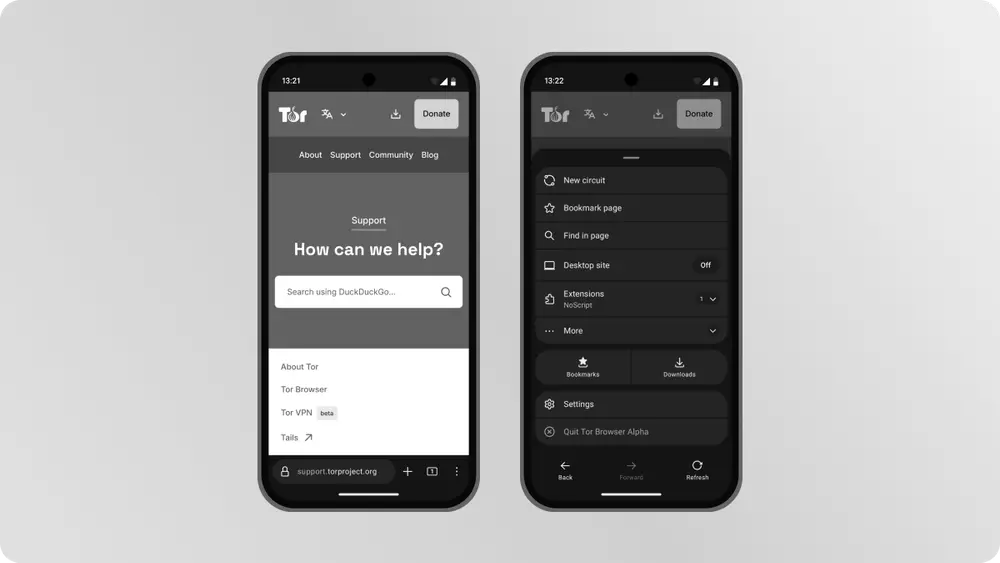
On Android, Tor Browser follows Firefox’s move to Jetpack Compose, and large parts of the interface now use Material Design 3. Size is the other headache: Google Play caps APKs at 100 MB and Firefox for Android keeps growing, so the team squeezed the browser’s built-in UI resources harder to stay under the limit.
The changelog has plenty more for Android: AI features are disabled; the passwords UI, the new tab bar and the expanded toolbar option (a fingerprinting risk) are removed; NoScript is always on; feedback when Tor connects and the restart flow after errors are improved; and Android x86 builds are dropped.
Other changes on every platform
- tor 0.4.9.15 and NoScript 13.6.37.1984.
- WebGPU is disabled until it has been audited.
- Firefox’s AI settings are hidden, and DuckDuckGo’s “No AI” version joins the list of search engines.
.onionorigins are redacted fromLocation.ancestorOrigins, and picture-in-picture sizes are spoofed under fingerprinting resistance.
Next up is a new circuit display, heading to Alpha first, that shows multi-path circuits, where traffic is split across two paths that meet at a single exit. It will also be the first time the circuit display appears on Android.
How to update
On desktop Tor Browser updates itself: open it, let it download the new version and restart, or trigger a check from ☰ → Help → About Tor Browser. Fresh downloads are on torproject.org. On Android it arrives through whichever store you installed it from, or as an APK from the same site. There’s no update for 32-bit Linux; you’ll need a 64-bit system.
What it means for Tails
Tails, the live system that forces all traffic through Tor, has already moved: Tails 7.16, released on 30 October, ships Tor Browser 16.0 and tor 0.4.9.15, and also fixes OpenPGP support in Thunderbird. Automatic upgrades work from any Tails 7.0 or later. For reference, back in June we covered Tails 7.9, which still came with Tor Browser 15. The Tor Browser announcement itself points to Tails for protection against other applications on the computer, which no browser can fully handle on its own.
If you run Tor Browser inside Qubes OS or another system, how you get 16.0 depends on how it’s installed there; our guide to privacy distros explains how Tails, Qubes OS and Whonix differ.
Sources: the Tor Project’s Tor Browser 16.0 announcement and full changelog; Tails 7.16 release notes.