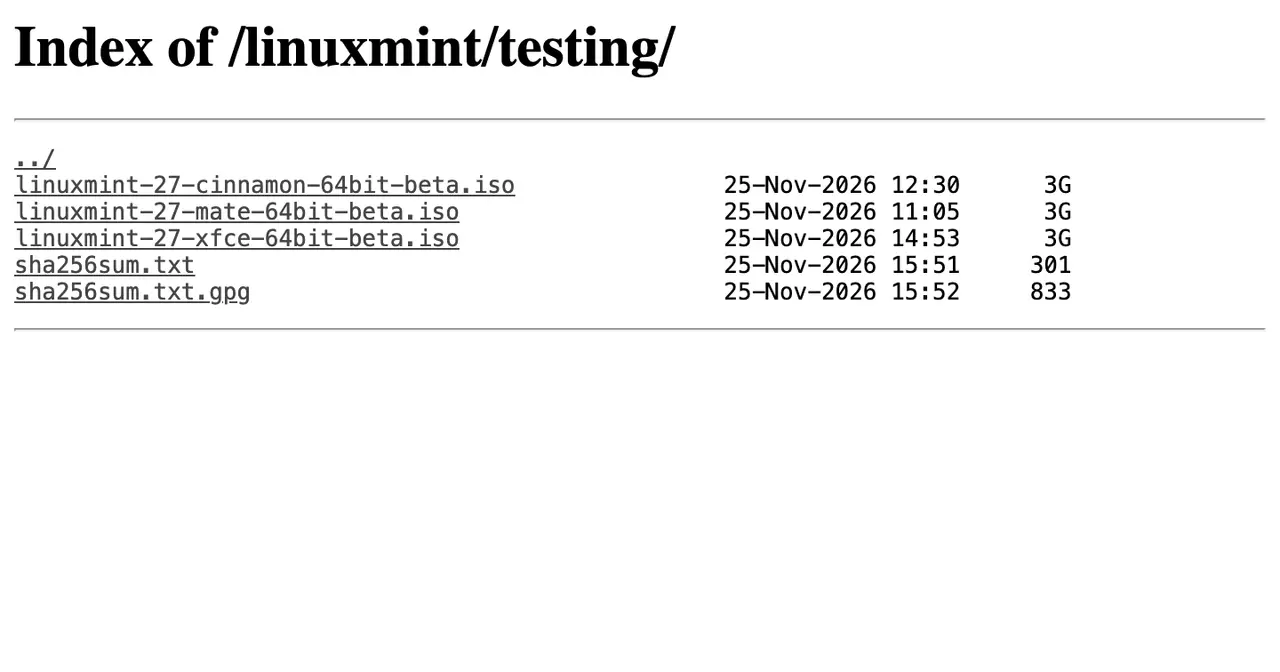
Linux Mint 27 «Adrien» has a beta. All three images, Cinnamon, Xfce and MATE, showed up on 25 November in the testing folder of the official mirrors, together with the sha256sum.txt checksum file and its signature. Mint usually puts the ISOs on the mirrors before it posts the announcement on its blog, and it did so again: on 26 November, when we downloaded them, the blog had not said anything yet.
Two weeks ago we reported that the team was freezing Cinnamon 6.8 and its projects. The beta is the next step. The final release is planned for Christmas.
Since there are no release notes yet (the rel_adrien.php and rel_adrien_whatsnew.php pages still return a 404), we downloaded the Cinnamon ISO, checked its signature and looked inside to see what it ships.
What is inside the Cinnamon ISO
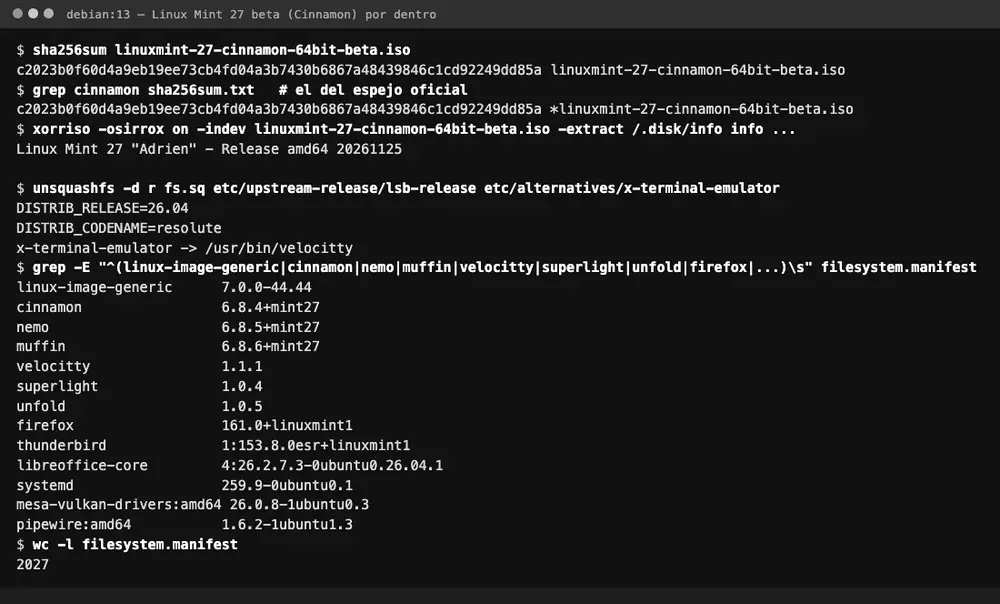
The .disk/info file identifies it as Linux Mint 27 "Adrien" - Release amd64 20261125, and the file system names Ubuntu 26.04 LTS («Resolute Raccoon») as its base. It has 2,027 packages installed. These are the versions that matter:
| Component | Version in the beta |
|---|---|
| Kernel | Linux 7.0 (linux-image-generic 7.0.0-44) |
| Desktop | Cinnamon 6.8.4, Muffin 6.8.6, Nemo 6.8.5 |
| Default terminal | Velocitty 1.1.1 |
| New apps | Superlight 1.0.4 (system monitor), Unfold 1.0.5 (archive manager) |
| Browser and mail | Firefox 161.0, Thunderbird 153.8 ESR |
| Office | LibreOffice 26.2.7 |
| System | systemd 259.9, Python 3.14.3, GCC 15.2 |
| Graphics and sound | Mesa 26.0.8, PipeWire 1.6.2, WirePlumber 0.5.13, GTK 4.22 |
| Others | Flatpak 1.16.6, Timeshift 26.11.2, Warpinator 2.0.8 |
Three details in the beta
- The kernel is 7.0, the one Ubuntu 26.04 shipped with, not a newer HWE kernel. That is the norm for the first Mint release on a new base.
- Cinnamon is already at 6.8.4. Since 6.8.0 was tagged on 4 November there have been four bug-fix releases, and Muffin and Nemo have moved up too.
- There is a Wayland session on the login screen (
Cinnamon (Wayland)), alongside the Xorg one, which is still the default (user-session=cinnamonin LightDM). The gesture and Wayland improvements we covered are in there.
Velocitty replaces GNOME Terminal
The most visible change is the terminal. In the beta, the x-terminal-emulator alternative points to Velocitty, Mint’s own terminal shown in October, with coloured tabs for sudo and remote sessions. GNOME Terminal is no longer installed, and neither is Ptyxis (Minted), the patched Ptyxis that appeared on Mint’s GitHub in September. If anyone expected that to be the plan for 27, the ISO says no, at least for now.
Velocitty comes with Superlight, the system monitor, and Unfold, the archive manager. We introduced all three when we wrote about Linux Mint’s new apps. The three packages declare a GPL-3+ licence and their code is on GitHub under the xapp-project organisation (home of Mint’s shared apps). Velocitty is written in Python with GTK 4, libadwaita and VTE. Superlight and Unfold use GTK 3 and XApp, and Unfold relies on 7zip to extract archives.
How to try it
The beta is for testing, not for daily use. The usual way is to boot it live from a USB stick or install it in a virtual machine. There are three 64-bit editions:
| Edition | ISO size |
|---|---|
| Cinnamon | 3.29 GB |
| MATE | 3.37 GB |
| Xfce | 3.23 GB |
Check the checksum and the signature before writing it to a stick. The sha256sum.txt file is signed with the Linux Mint key (27DE B156 44C6 B3CF 3BD7 D291 300F 846B A25B AE09) and the signature is valid. Bugs go to the GitHub repository of the affected component, as usual with Mint.
If you run Linux Mint 22.3, there is no official way to upgrade to 27 yet. On previous base changes, the upgrade tool arrived after the final release.
How we tested this
On 26 November 2026 we downloaded linuxmint-27-cinnamon-64bit-beta.iso from the kernel.org mirror and checked the signature of the checksums. Then we opened it in a debian:13 (arm64) container without booting it: the ISO is amd64 and we did not run it here. We only read its files.
B=https://mirrors.edge.kernel.org/linuxmint/testing
curl -LO $B/linuxmint-27-cinnamon-64bit-beta.iso -LO $B/sha256sum.txt -LO $B/sha256sum.txt.gpg
gpg --keyserver hkps://keyserver.ubuntu.com --recv-key 27DEB15644C6B3CF3BD7D291300F846BA25BAE09
gpg --verify sha256sum.txt.gpg sha256sum.txt
sha256sum -c --ignore-missing sha256sum.txt

docker run --rm -it -v "$PWD:/iso:ro" debian:13 bash
apt update && apt install -y xorriso squashfs-tools
xorriso -osirrox on -indev /iso/linuxmint-27-cinnamon-64bit-beta.iso \
  -extract /.disk/info info -extract /casper/filesystem.manifest man \
  -extract /casper/filesystem.squashfs fs.sq
cat info; wc -l man
unsquashfs -d r fs.sq etc/upstream-release/lsb-release etc/alternatives/x-terminal-emulator usr/share/wayland-sessions
grep -E '^(linux-image-generic|cinnamon|nemo|muffin|velocitty|superlight|unfold|firefox)\s' man
Sources
- The
testingfolder of Linux Mint’s official mirror at kernel.org, with the three ISOs,sha256sum.txtand its signature (25 Nov 2026). - Monthly News – October 2026, Linux Mint blog.
- The Cinnamon, Velocitty, Superlight and Unfold repositories on GitHub.
- Verify your ISO image, Linux Mint installation guide.