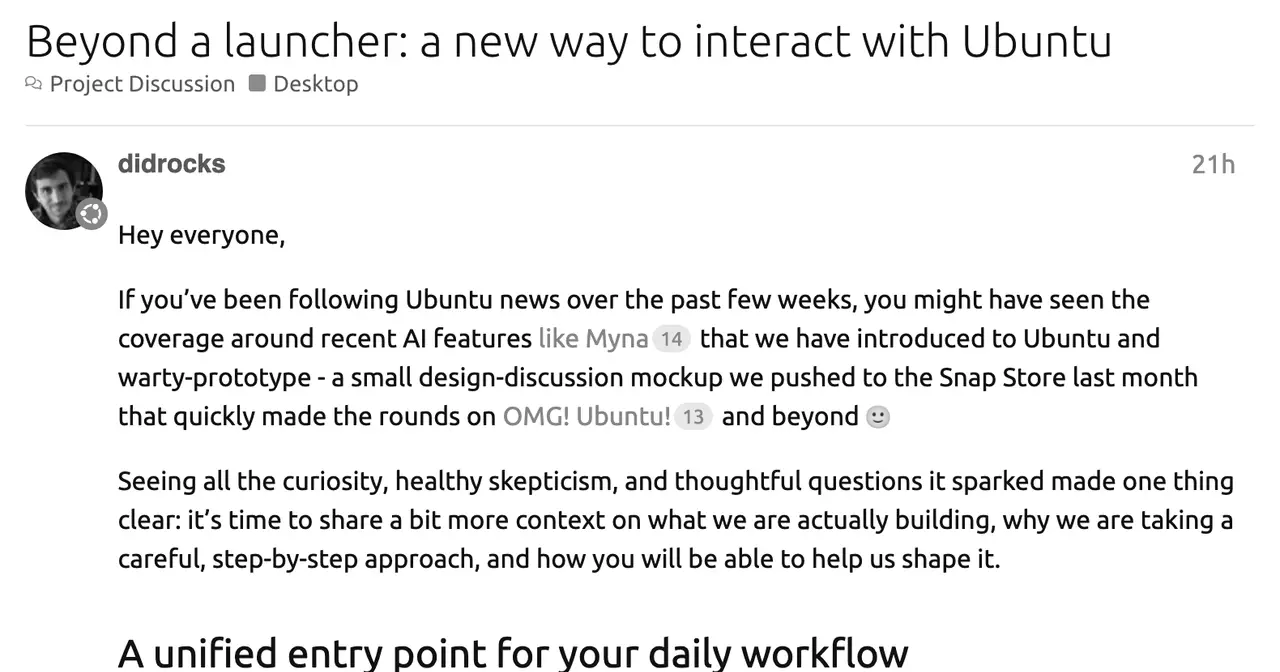
Canonical wants the Ubuntu desktop to have a single entry point for almost everything: launching apps, finding files and, when the user explicitly asks for it, calling on AI. Didier Roche, an engineer on the desktop team, laid it out in a post published on 24 November 2026 on Ubuntu Discourse titled «Beyond a launcher: a new way to interact with Ubuntu». The first version you can install is due in January.
Some headlines summed it up as “Ubuntu replaces the app grid with an AI launcher”. That is not quite what Roche says. He writes that finding files and launching applications instantly “is right at the core” of the project, but that the goal “goes further than replacing an app grid”. There is no date for the launcher to become the default in any Ubuntu release, and nothing is said about what happens to GNOME’s app view.
What Canonical announced
The post is a response to the buzz of the past few weeks. In October Canonical pushed warty-prototype to the Snap Store, a mock-up of the launcher meant for design discussion, and the tech press quickly picked it up as a preview of an AI desktop. Roche now clarifies that it was “just an automated UI simulation to test ideas” and that turning it into something reliable for everyday use is “a significant engineering task”.
The idea, according to the post, is to avoid “scattering disconnected AI widgets across the desktop” and offer instead a single keyboard- and speech-friendly entry point that bridges apps, the user’s local context and smart assistance, the latter only when explicitly requested.
The plan comes in stages. First the fundamentals: fast startup, low resource use, clean desktop integration. Then the rest, piece by piece. Roche compares it to other deep changes Ubuntu has made slowly, such as moving system utilities to Rust with sudo-rs and rust-coreutils, dynamic triple buffering in GNOME and TPM-backed disk encryption.
At the end of the post there is a screenshot captioned “This is working code, not the prototype anymore!”. It shows an Ubuntu desktop with the 26.04 wallpaper and the launcher box floating in the middle, with “AI” mode switched on, a wallpaper file attached and the request “Set this as my wallpaper and adapt my theme to it”. That is exactly one of the three scenarios the October mock-up only simulated.
The four principles
Canonical commits to four things it calls “non-negotiable”:
| Principle | What the post says |
|---|---|
| Strictly optional | Every AI feature is opt-in. The launcher without AI is a first-class experience out of the box, and the default install won’t ship “gigabytes of models” |
| Local-first | The priority is on-device inference with local models, not sending queries to the cloud by default |
| Privacy-first | Since processing is local, files, context and habits stay on the disk |
| Security-first | Components run isolated under Ubuntu’s confinement so that experimental or agentic features cannot compromise the host |
It fits what Jon Seager, Ubuntu’s VP of engineering, explained in April in the «The future of AI in Ubuntu» thread: AI features would arrive as snaps on top of the system, as an opt-in preview in Ubuntu 26.10, and in later releases with a step in the first-run wizard to choose whether you want them. Seager ruled out a “global kill switch”, though he added that removing those snaps effectively acts as one. Cloud inference would have to be configured by hand with a credential. Ubuntu 26.04 LTS ships none of this, although anyone who wants it will be able to install it. We covered that in our piece on what’s coming in Ubuntu 27.04.
What we found inside the prototype
Since warty-prototype is still in the Snap Store, we downloaded and unpacked it to check what it was. Its metadata is clear: it is a “design prototype” of the “launcher V1” with three AI scenarios (match the desktop to a photo, find a reader for a file and turn the clipboard into a visit plan). The snap.yaml itself admits that “everything is simulated”. The window and the panel indicator are real, but every action only posts a notification naming what would have happened.
Under the hood it is a Flutter app. It ships libflutter_linux_gtk.so, the compiled app code in libapp.so and plugins to place the window and use the Yaru theme. We did not find a single AI model (no .gguf, .onnx, .safetensors or .tflite), so the “smart” part of the mock-up was as simulated as its description says. It is 25 MB compressed and 105 MB unpacked, amd64 only, in the edge test channel.
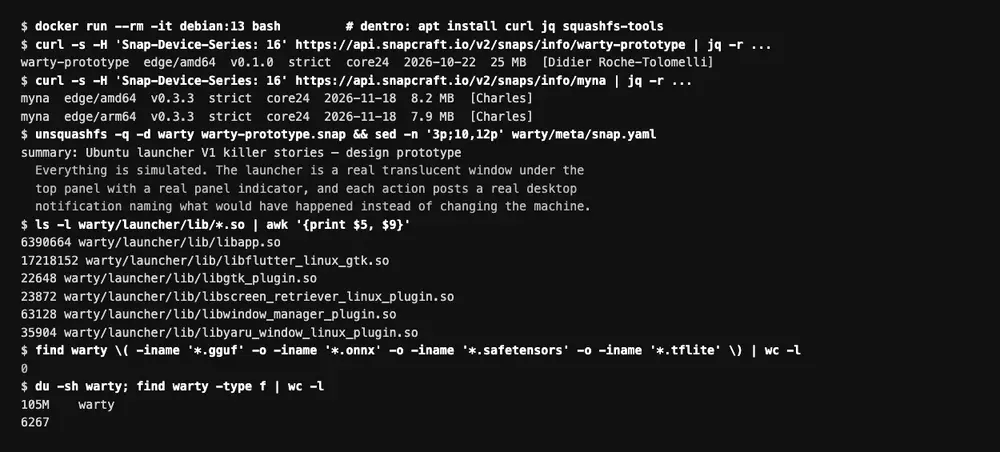
The Snap Store also has myna in edge (version 0.3.3, 18 November, for amd64 and arm64). It is the offline dictation client Canonical introduced on 12 October as a technology preview: it transcribes with engines such as Parakeet, Whisper or FunASR and types the text into the focused application. The install route Canonical gives is a PPA (ppa:canonical-desktop-team/myna) for Ubuntu 24.04, 26.04 and 26.10 with GNOME on Wayland. Canonical insists Myna is only for dictation: it is not a voice assistant and does not control the desktop.
What we still don’t know
- When it will land and in which release. Roche only mentions a first version in January to try out and give feedback on, along with a deeper look at the architecture. He doesn’t say whether it will be in Ubuntu 27.04 or become the default launcher.
- What happens to GNOME’s app view. The post doesn’t say it will go away.
- Which models it will use and what hardware they’ll need. All we know is that they’ll be local and won’t come in the default install. Canonical ships its inference pieces as snaps, the route Seager described.
- Whether it will be free software from day one. The October prototype declares no licence in the Snap Store (it shows as
unset). Myna’s code is open on GitHub.
The first replies in the thread compare it to Windows 11 search, Alfred and macOS Spotlight. They welcome the local, opt-in approach, and one asks for it to be extensible with custom scripts, the way Vicinae is. Doubts followed: one user asks how it will fit with GNOME, since having two search boxes, the one in the Activities overview and the launcher’s, would be odd; another, on 26 November, wants Canonical to fix the bugs that came with 26.04’s switch to the Rust utilities before adding “yet another unnecessary feature”. Roche has not replied yet. Seager’s April thread, by contrast, is already past 75 posts and nearly 26,000 views. We have been tracking this in our roundup of AI in free software and in our piece on Ubuntu Pro’s AI-written security patches.
How we tested this
On 25 November 2026, in a debian:13 (arm64) container with curl, jq and squashfs-tools, we queried the public Snap Store API for the warty-prototype and myna snaps and downloaded the first one. A snap is a SquashFS filesystem, so unsquashfs opens it even if it is not built for your architecture and without running it:
docker run --rm -it debian:13 bash
apt update && apt install -y curl jq squashfs-tools
H='Snap-Device-Series: 16'
curl -s -H "$H" "https://api.snapcraft.io/v2/snaps/info/warty-prototype?fields=version,confinement,base,download,publisher" | jq
URL=$(curl -s -H "$H" "https://api.snapcraft.io/v2/snaps/info/warty-prototype?fields=download" | jq -r '."channel-map"[0].download.url')
curl -sL -o warty-prototype.snap "$URL"
unsquashfs -q -d warty warty-prototype.snap
cat warty/meta/snap.yaml
ls -l warty/launcher/lib/
find warty \( -iname '*.gguf' -o -iname '*.onnx' -o -iname '*.safetensors' -o -iname '*.tflite' \) | wc -l
We did not run the launcher: it is amd64 only and needs a GNOME session.
Sources
- Didier Roche, «Beyond a launcher: a new way to interact with Ubuntu», Ubuntu Discourse, 24 Nov 2026.
- Jon Seager, reply in «The future of AI in Ubuntu», Ubuntu Discourse, 28 Apr 2026.
- Jean-Baptiste Lallement, «Myna speech-to-text is now available as a technology preview», Ubuntu blog, 12 Oct 2026.
- canonical/myna, GitHub.
- Ubuntu Summit: 26.10 opening remarks and 26.04 welcome keynote, Canonical’s official channel.
- Snap Store API:
/v2/snaps/info/warty-prototypeand/v2/snaps/info/myna(headerSnap-Device-Series: 16).